
If your JUUL Device is not charging, the problem is almost never what you think it is. Most UAE users assume the battery has died and reach for a replacement, but the actual cause is far more straightforward in the majority of cases a dirty contact, a weak USB adapter, or a device that has been sitting in a parked car for too long. This guide walks through every realistic cause and shows you how to fix it before spending a dirham on a new device.
The UAE environment makes JUUL charging problems more common than they would be elsewhere. Temperatures regularly exceed 40°C, fine dust settles into every exposed surface, and devices travel constantly between air-conditioned offices and scorching outdoor air. All of that creates conditions that disrupt charging but conditions that are entirely manageable once you understand what’s happening.
How JUUL Charging Works
JUUL uses a magnetic USB charging dock rather than a traditional port. Two small contact points on the base of the device connect to matching pins on the dock, pulling power from any standard USB-A source. The design is intentionally simple, but it means the contact surfaces are exposed to air, skin oils, and debris every day. The internal battery is a lithium-ion cell that charges to full capacity in roughly one hour under normal conditions, and a single LED indicator tells you exactly what the battery is doing at any given moment.
What matters for troubleshooting is understanding the difference between a charger problem and a device problem. The two are entirely separate, and misidentifying which one is faulty is the main reason people replace working devices unnecessarily. For a broader picture of how JUUL devices and their components work together, the JUUL 2 Device and Pods Complete Guide covers the system in full detail.
Signs Your JUUL Is Not Charging Properly
Each symptom pattern points toward a specific cause. Before you do anything else, observe what the LED does the moment the charger makes contact:
- No LED at all: Either the charger is faulty or the battery has entered deep discharge. Test with a different dock first.
- LED flashes briefly then turns off: The circuit made contact but couldn’t sustain it. Classic sign of dirty contacts or a weak USB adapter.
- Charges only when held at a specific angle: The charger dock has a bent pin or weakened magnets, a mechanical problem, not a battery problem.
- Charges extremely slowly: The USB adapter is likely underpowered. Try a wall adapter rated at 5V/1A or higher.
- Device gets unusually hot during charging: Heat exposure may have triggered a thermal safety cutoff. Remove, cool, and retry.
- Battery drains much faster than it used to: Internal battery wear, often accelerated by UAE summer heat exposure.
Understanding these patterns is also covered well in the JUUL Device Light Meanings and Quick Fixes guide, which explains every LED pattern in detail alongside specific remedies.
Quick Troubleshooting Checklist
Work through these in order before going deeper. Most JUUL charging issues resolve somewhere on this list:
- Remove and firmly reconnect the charger
- Switch from a computer USB port to a wall adapter
- Try a different wall adapter entirely (5V/1A minimum output)
- Wipe both the device contacts and the dock pins with a dry cotton swab
- Leave connected for at least 15 minutes before checking for LED activity
- Check that the dock is sitting flush and square against the device base
- Test your device with a borrowed charging dock from another JUUL user
The Most Common Causes and How to Fix Them
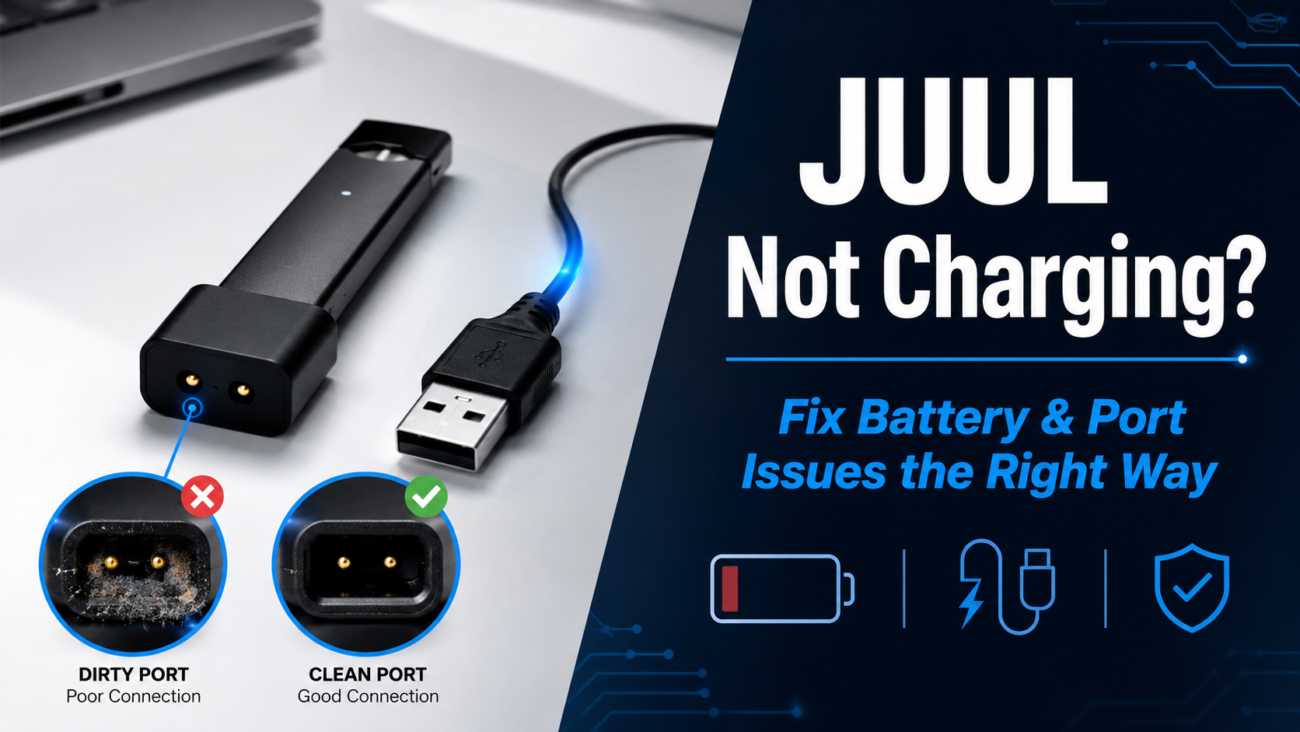
Dirty Charging Contacts
This is the single most frequent cause of JUUL not charging, and the one most users overlook. The two gold contact points on the device base pick up skin oil, pocket lint, fine dust, and e-liquid residue every single day. Even a film of oil too thin to see with the naked eye is enough to break the circuit. The tell-tale sign is intermittent behavior sometimes the device charges, sometimes it doesn’t or a brief LED flash that disappears before charging is established.
Fix it by taking a fresh, dry cotton swab and gently wiping each contact point in a circular motion. Do the same to the dock pins. Never use water, alcohol soaks, or metal tools on the contacts. A soft dry toothbrush can clear stubborn debris in the crevice without scratching the surface. Once cleaned, reconnect and wait for the pulsing white LED to confirm active charging. Making this a weekly habit eliminates most contact-related failures entirely.
Faulty Charging Dock
The charging dock takes physical stress every day, it’s plugged and unplugged repeatedly, the cable is pulled at angles, and the magnets weaken gradually over months of use. A dock that looks intact from the outside can have internal wiring fractures or bent pins that interrupt power delivery completely. Signs of a failing dock include a cable that feels loose even when fully inserted, magnets that no longer grip the device firmly, visible discoloration around the contact pins, or a device that only charges when you hold the dock at a specific position.
The fastest diagnostic test: borrow a dock from a friend or colleague and try it with your device. If your device charges normally on the borrowed dock, replace your dock rather than your device. If neither dock works on your device, the fault lies within the device itself. You can find genuine JUUL accessories including replacement docks without guessing at compatibility.
Weak or Damaged USB Adapter
Not all USB adapters deliver the same output. Laptop USB ports typically run at 0.5A in standard mode barely enough to sustain a charge on a lithium battery. Third-party wall adapters sold in smaller electronics shops across the UAE vary wildly in actual output versus stated ratings, and some counterfeit adapters deliver well below 1A regardless of what’s printed on them. If you’ve been using the same third-party adapter for over a year, testing a fresh certified adapter is one of the quickest wins available.
Always use a 5V/1A wall adapter at minimum. Avoid USB hubs, keyboard ports, power strips with built-in USB, and car chargers unless they’re from a reliable brand. Fast chargers above 12W are also inadvisable JUUL’s battery is not designed for high-current protocols and the excess voltage generates internal heat.
Battery in Deep Discharge
Lithium-ion batteries that have been completely depleted and left uncharged for an extended period enter a low-voltage state where the battery management circuit won’t initiate normal charging. When you connect the charger in this state, you may see no LED response at all which looks exactly like a dead device but usually isn’t. The battery needs time to recover enough voltage to register on the circuit.
Connect to a known-good charger and adapter and leave it completely undisturbed for 20 to 30 minutes before checking for any LED response. Avoid repeatedly disconnecting and reconnecting that interrupts the recovery process. If a faint or intermittent LED appears after this waiting period, the battery is coming back and normal charging should follow within the hour. Recovery is not always possible if deep discharge has happened multiple times, as each event permanently reduces the battery’s maximum capacity.
UAE Heat Damage
This is the cause most specific to users in the UAE and the one with the most permanent consequences. The interior of a parked car in Dubai in summer reaches 70°C to 80°C within 20 minutes. Lithium-ion chemistry degrades irreversibly at sustained temperatures above 45°C. Even without direct sun, devices left on windowsills, taken to beach environments, or stored in apartments without adequate cooling during peak summer months accumulate heat stress that shortens battery life progressively.
When a device overheats, the battery management system may trigger a thermal cutoff, refusing to accept any charge until internal temperature drops to a safe level. If your device feels warm when you pick it up (not from use, just from sitting), let it cool for at least 15 minutes in an air-conditioned environment before attempting to charge. Safe charging temperature is between 10°C and 35°C. The dedicated guide on Battery Life Tips for JUUL Users in UAE goes into more detail on how to protect battery performance in hot climates.
Also worth reading alongside this is the guide on how temperature affects JUUL pod flavour and nicotine delivery, which explains the broader effects of UAE heat on the entire device system, not just the battery.
Moisture and Humidity Damage
The UAE’s coastal cities Dubai, Abu Dhabi, Sharjah, carry significant humidity through much of the year, peaking between June and September. Condensation can form inside a device that moves repeatedly between cold air-conditioned interiors and hot humid outdoor air. Saltwater environments at beaches add corrosive mist to the equation. Signs of moisture damage include visible green-white corrosion on the contact points, unusual smell during charging, or charging behavior that is consistently inconsistent with no other identifiable cause.
If you suspect condensation has entered the device, place it in a dry room-temperature environment for 24 to 48 hours before attempting to charge again. Do not place it in rice that’s a myth that doesn’t work reliably on electronics. If the contacts show visible corrosion, the damage may already be permanent.
Internal Battery Wear
Every lithium battery has a finite number of charge cycles. Heavy daily users in the UAE, where the device may be charged two or three times a day to compensate for heat-related capacity loss can exhaust the practical battery lifespan within four to eight months. An aging battery charges more slowly, holds less total charge, and may shut off unexpectedly at battery percentages that should still indicate remaining charge.
There is no user fix for a genuinely worn battery. The cell is sealed and cannot be replaced. If your device charges fully but runs out far faster than it once did, it’s time to look at the JUUL device category or JUUL 2 devices for a replacement. When buying a new device, pair it with JUUL 2 pods that are compatible and from a verified source.
How to Test: Charger or Device?
This is the most important diagnostic step before spending money. Run these tests in sequence:
- Test your device on a borrowed dock. If it charges the dock is your problem. Replace the dock.
- Test your dock on a different JUUL device. If the other device charges the dock works fine and your device is the issue.
- Switch to a different USB wall adapter. If the device then charges the adapter was underpowered or faulty.
- Try a desktop computer USB port. Eliminates the adapter entirely as a variable.
If the device fails to charge under any combination of dock, adapter, and USB port, the fault is internal. For a complete picture of what all the failure patterns mean, the JUUL Troubleshooting Guide covers device-level diagnostics beyond charging issues alone. And if you’ve been dealing with your device hitting inconsistently in addition to charging problems, see also JUUL Not Hitting Properly Even Fully Charged the two issues sometimes share a root cause.
What the LED Tells You During Charging
- Pulsing white: Normal active charging. Leave it connected.
- Solid white: Fully charged. Disconnect now to avoid unnecessary battery stress.
- Brief flash then nothing: Intermittent contact. Clean both the device and dock contacts.
- No light at all: Test a different dock first. If still nothing, suspect deep discharge or internal fault.
- Rapid repeated flashing: Possible thermal cutoff or hardware fault. Remove from charger, allow to cool, and retest.
Charging Best Practices for UAE Users
These habits prevent the majority of charging problems from developing in the first place:
- Use a certified 5V/1A wall adapter and the official JUUL charging dock
- Charge before the battery reaches complete depletion deep discharge accumulates permanent damage
- Disconnect when the LED turns solid white, do not leave charging overnight as a routine
- Clean both the device contacts and dock pins weekly with a dry cotton swab
- Never charge in a parked vehicle, in direct sunlight, or in spaces above 40°C
- Store the device in a case to reduce contact contamination between uses
- If storing unused for more than a week, charge to roughly 50% before leaving it
For users who are also thinking about pod longevity alongside device care, the guide on how to store vape pods in UAE heat covers the other side of the equation keeping your pods in good condition so the device has less work to do.
When to Replace Instead of Repair
There is a point where continued troubleshooting stops making sense. If you’ve cleaned the contacts, tested multiple docks and adapters, tried different USB sources, and allowed adequate recovery time for a deeply discharged battery and the device still won’t charge look for these specific conditions:
- Burning, blackening, or physical deformation on the charging contacts
- Visible green-white corrosion indicating moisture damage to the internal circuit
- The device never powers on under any charging combination
- Physical cracks in the device body
- Battery that holds zero charge even after a confirmed successful charge cycle
In these cases, a new device is the practical choice. Browse the current JUUL device range and JUUL 2 devices available in the UAE, and pick up your replacement JUUL pods at the same time. Always buy from a verified source, the guide on Tips for Buying JUUL Online in UAE Without Getting Scammed is worth reading before purchasing to avoid counterfeit products that introduce their own charging risks.
Frequently Asked Questions
Why is my JUUL not charging even though the charger seems fine?
Most likely dirty contacts on the device itself. Even when the dock functions normally, a film of oil or dust on the device’s contact points breaks the circuit. Clean both surfaces with a dry cotton swab and reconnect.
Can dust stop a JUUL from charging?
Yes. Fine dust especially the type common in UAE construction and desert environments settles on exposed contacts and creates resistance that prevents a stable charging circuit. Weekly cleaning prevents this entirely.
Can UAE summer heat permanently damage the battery?
Yes. Sustained exposure above 45°C causes irreversible chemical degradation to lithium-ion cells. Leaving a device in a parked car for even 20 minutes in summer can cause damage that reduces long-term battery capacity permanently.
How long should a JUUL take to fully charge?
Approximately one hour with a quality 5V/1A wall adapter. If it takes significantly longer, the adapter is underpowered, the contacts are partially contaminated, or the battery is aging.
Should I replace the charger or the device first?
Always test the charger first. Run the isolation tests described above, test your device on a borrowed dock, and your dock on a borrowed device. This two-minute test tells you exactly which component is at fault.
Is it safe to charge JUUL overnight?
Occasional overnight charging is unlikely to cause immediate harm, but doing it routinely adds unnecessary stress to the battery. JUUL charges in about one hour, so overnight charging is never actually necessary.
Final Thoughts
The large majority of JUUL charging problems come down to three things: dirty contacts, a failing dock, or a USB adapter that isn’t delivering enough power. Heat damage is the fourth factor that UAE users face more acutely than anyone else. Work through the problem systematically clean first, test the dock second, verify the adapter third. Most users find the solution before they reach step three.
Keeping your device out of hot environments, cleaning contacts weekly, and charging with a certified wall adapter transforms JUUL charging from a recurring frustration into something that simply works. When replacement is genuinely necessary, start with the charger it’s cheaper and it’s usually right. The JUUL 2 pods and JUUL 2 device range at Pods Vibe are worth looking at when the time does come.