JUUL Pod Not Recognized? Here’s How to Fix the Connection in Seconds

On this page11 sections
- Why This Happens: The Real Reasons Your JUUL Isn’t Recognizing the Pod
- The 60-Second Fix: Step-by-Step Troubleshooting
- Understanding JUUL’s Blinking Light Signals
- How UAE Heat and Humidity Affect Pod Connection
- When It’s the Pod, Not the Device
- When It’s the Battery, Not the Pod
- Preventing Future Connection Problems
- JUUL Compatibility and Compliance in the UAE
- Where to Buy Genuine JUUL Pods and Devices in the UAE
- FAQ
- Final Fix Checklist
Your JUUL is blinking. You just put in a fresh pod. Nothing happens. This is one of the most common problems JUUL users run into, and in almost every case, it has nothing to do with your device being broken. It’s a connection issue, and you can usually fix it in under a minute without any tools or a replacement.
Here’s the short answer: most “pod not recognized” errors come from dirty contact pins, a pod that isn’t seated all the way, or e-liquid residue blocking the connection. Clean the pins, reseat the pod firmly, and you’re back in business. Below, we’ll walk through exactly why this happens, how to fix it step by step, and how UAE heat and humidity make it worse.
Why This Happens: The Real Reasons Your JUUL Isn’t Recognizing the Pod
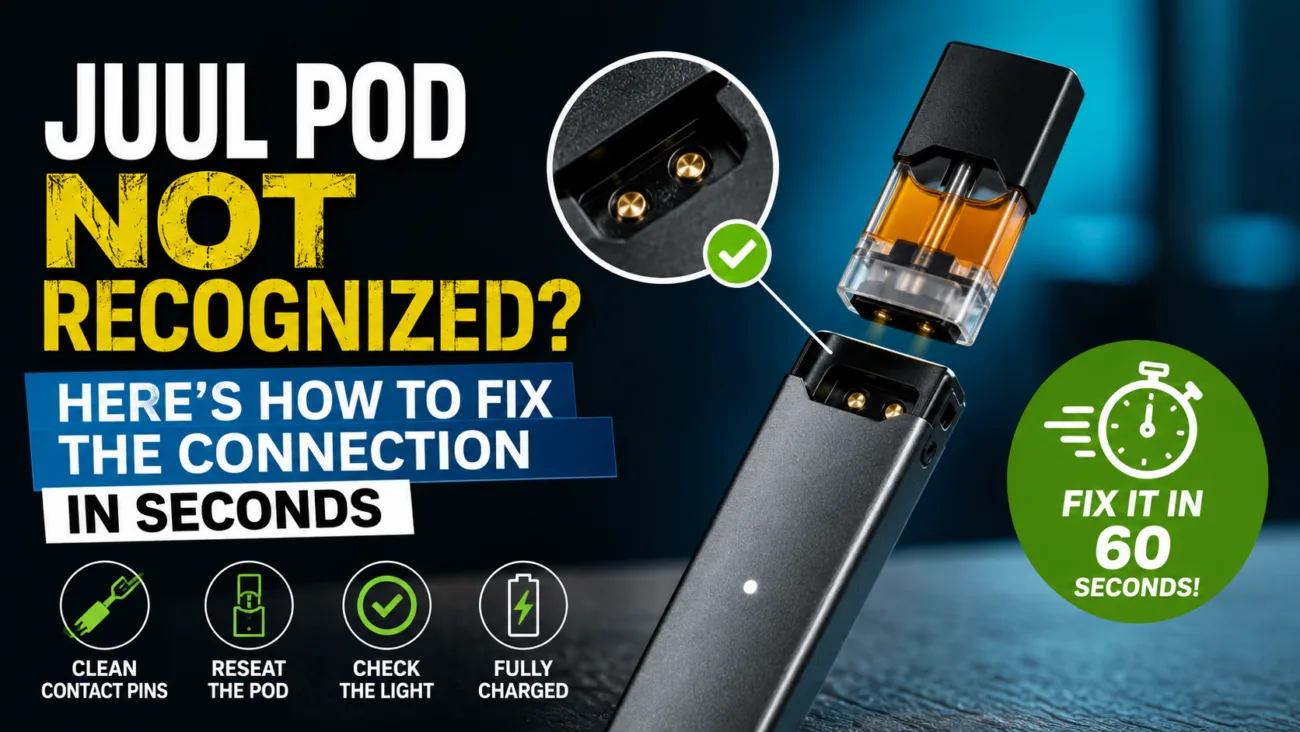
A JUUL activates through two small gold contact pins inside the device. When you insert a pod, those pins touch matching contacts on the pod, and the device reads that connection to power the heating element. If that contact is interrupted in any way, the device won’t recognize the pod is there.
Dirty or oxidized contact pins. E-liquid vapor condenses over time and leaves a thin residue on the pins. This residue acts as an insulator, blocking the electrical signal even though the pod is physically in place.
Pod not fully seated. JUUL pods need a firm, complete push into the device. A pod that looks inserted but isn’t fully clicked in won’t make contact.
E-liquid residue blocking the connection. Leaking pods, especially ones stored on their side or in heat, can pool liquid around the base and gum up the connection point.
Battery-related recognition failures. A very low battery can sometimes prevent the device from powering the pod detection circuit properly, which mimics a “not recognized” error.
Faulty or empty pod. Occasionally the pod itself is the problem, either from manufacturing defects or because it’s fully empty and the device is flagging it correctly.
The 60-Second Fix: Step-by-Step Troubleshooting
Work through these in order. Most people solve the issue by step two.
- Remove and inspect the pod. Pull it out and look at the gold contacts on both the pod and inside the device port for visible residue, discoloration, or liquid.
- Clean the gold contact pins. Use a dry cotton swab first. If residue remains, lightly dampen the swab with isopropyl alcohol, clean both the pod’s contacts and the device’s pins, then let it air dry for 30 seconds before reinserting. Never use water.
- Reseat the pod correctly. Push the pod straight down into the port until you feel and hear it click. Don’t insert it at an angle.
- Check the blinking light pattern. The number of blinks tells you what the device is detecting. This narrows down whether it’s a pod issue or something else.
- Test with a different pod. If a second pod works fine in the same device, the first pod is likely faulty, not your JUUL.
Understanding JUUL’s Blinking Light Signals
The light on your JUUL isn’t random. It’s communicating a specific status.
| Light Pattern | What It Means |
|---|---|
| Solid light while inhaling | Device is working normally |
| Slow blink | Battery is low |
| Fast blink (multiple flashes on insert) | Device isn’t detecting the pod properly |
| No light at all | Battery is likely dead or device has powered off |
A blinking light on pod insertion almost always points to a connection issue you can fix yourself. It becomes a real fault only if cleaning and reseating don’t resolve it after two or three attempts with a pod you know is working.
How UAE Heat and Humidity Affect Pod Connection
This matters more in the UAE than in most markets, and it’s worth taking seriously.
- Storing devices in cars or direct sun. Cabin temperatures in Dubai and Abu Dhabi regularly exceed 60°C in summer. That heat thins the e-liquid, increases the chance of leaking, and accelerates residue buildup on the contacts.
- Condensation from humidity. Moving a device from an air-conditioned space into humid outdoor air causes condensation to form inside the pod chamber, which can sit directly on the contact pins.
- Best practice: Keep your device and spare pods in a bag or drawer away from direct sunlight, avoid leaving them in a parked car, and wipe the contacts if you notice any moisture after temperature changes.
When It’s the Pod, Not the Device
If cleaning and reseating don’t work, and a second pod fixes the problem immediately, the original pod is at fault.
- Signs of a faulty or counterfeit pod: inconsistent flavor, leaking from the mouthpiece, a loose fit in the device, or packaging that looks slightly different from what you’ve bought before.
- Why buying from authorized UAE retailers matters: counterfeit pods are a real problem in this market, and they’re far more likely to have connection and leaking issues because they aren’t built to the same manufacturing tolerances as genuine stock.
When It’s the Battery, Not the Pod
Sometimes the pod is fine and the device is the issue.
- Low battery recognition errors: if your JUUL hasn’t been charged in a while, try charging it fully before troubleshooting further.
- Charging port debris: dust or lint in the charging port can prevent a full charge, which then affects pod detection.
- How to confirm it’s a charging issue: if the device won’t turn on or light up at all, even with a known-working pod, charge it fully first before assuming the pod connection is the problem.
Preventing Future Connection Problems
- Wipe the contact pins with a dry swab every few pod changes, not just when there’s a problem.
- Store spare pods upright, away from heat and direct sunlight.
- Insert pods straight down. Don’t twist, force, or angle them into the port, since this can bend the contact pins over time.
JUUL Compatibility and Compliance in the UAE
Vaping products sold legally in the UAE fall under MoIAT (Ministry of Industry and Advanced Technology) and ESMA (Emirates Authority for Standardization and Metrology) regulation. Products registered under this framework have gone through compliance checks that unregistered or grey-market imports haven’t. Buying registered, compliant devices and pods isn’t just a legal formality, it also means the hardware has been tested against the manufacturing standards that keep connections consistent.
Where to Buy Genuine JUUL Pods and Devices in the UAE
If you’ve gone through every step above and the issue is the pod itself, the fastest fix is replacing it with a genuine one. PodsVibe stocks authentic JUUL devices and pods for UAE customers, which removes the counterfeit risk that causes a lot of these connection problems in the first place.
FAQ
Why does my JUUL blink multiple times when I insert a pod?
This is the device signaling that it can’t detect a proper connection with the pod. It’s almost always fixed by cleaning the gold contacts and reinserting the pod firmly.
Can a pod be “recognized” but still not hit?
Yes. Recognition and airflow are two separate systems. A pod can make electrical contact and still not produce vapor if the coil is saturated, the pod is nearly empty, or there’s an airflow blockage. If the light is solid but you’re not getting vapor, the issue is different from a “not recognized” error.
Does cleaning the pins void my warranty?
No. Gently cleaning the contact pins with a dry or lightly alcohol-dampened swab is standard maintenance and doesn’t affect your warranty. Forcing a pod in at an angle or using sharp objects to clean the port can cause physical damage that isn’t covered.
How do I know if my JUUL pod is fake?
Watch for inconsistent flavor between pods of the same type, leaking around the mouthpiece, a loose or wobbly fit in the device, and packaging that differs slightly from previous purchases. Buying from an authorized retailer is the most reliable way to avoid this altogether.
Can heat damage the connection permanently? Repeated extreme heat exposure, like leaving a device in a hot car regularly, can warp plastic components and accelerate residue buildup, which leads to more frequent connection issues over time. A single hot day usually won’t cause permanent damage, but it’s a habit worth avoiding.
Final Fix Checklist
- Remove the pod and check both sets of contacts for residue
- Clean gold pins with a dry swab, or lightly alcohol-dampened if needed
- Reinsert the pod straight down until it clicks
- Check the blink pattern to narrow down the cause
- Test with a second pod to isolate pod vs. device
- Charge fully if the device won’t respond at all
- Store devices and pods away from heat, sun, and humidity swings
If you’ve worked through this checklist and your JUUL still isn’t recognizing pods, the device itself may need servicing. But for the vast majority of users, a clean set of contacts and a properly seated pod solves it in seconds. And if it turns out the pod was the problem, podsvibe has genuine JUUL pods and devices ready to ship across the UAE.